TableWidgetExternCV.zip


QTableWidget에서 Excel의 값을 copy & paste 하려면, 아래의 코드를 이용하여, 값을 가져올 수 있다.
QClipboard *clipboard=QApplication::clipboard();
clipboard->text(); //클립보드에 저장된 Excel 의 값 가져오기
clipboard->setText(); //클립보드에 값을 복사한 후, Excel에 값 붙여 넣기

엑셀로 값을 내보내거나 가져올 때 값은  1\t2\t3\n4\t5\t6\n7\t8\t9\n
와 같이 정의 된다.
\t는 Column을 의미하며, \n은 Row를 의미한다.
위의 예시는
1 2 3
4 5 6
7 8 9
를 의미한다.


이 규칙만 잘 알면, copy & paste를 쉽게 할 수 있다.

CustomTableWidget 클래스 생성

void CustomTableWidget::keyPressEvent(QKeyEvent *event)

{
     QModelIndexList selectedIndexList=selectedIndexes();
     int startRow=selectedIndexList.first().row();
     int startColumn=selectedIndexList.first().column();
     if(event->matches(QKeySequence::Copy))
     {
          qSort(selectedIndexList.begin(),selectedIndexList.end());
          QClipboard *clipboard=QApplication::clipboard();
          QString Text;
          foreach (QModelIndex index, selectedIndexList)
          {
               if(index.row()!=startRow)
               {
                    Text.append("\n");
                    startRow=index.row();
                    startColumn=selectedIndexList.first().column();
               }
               if(index.column()!=startColumn)
               {
                     for(int i=0; i<index.column()-startColumn; i++)
                     {
                          Text.append("\t");
                     }
                     startColumn=index.column();
               }
              Text.append(index.data().toString());
           }
           clipboard->setText(Text);
       } 
      if(event->matches(QKeySequence::Paste))
      {
          QClipboard *clipboard=QApplication::clipboard();
          QStringList rowList=clipboard->text().split("\n");
          QStringList columnList;
          int number=0;

          foreach (QString row, rowList)
          {
               if(number++<rowList.count()-1)
               {
                     if(row.contains("\t"))
                     {
                          columnList=row.split("\t");
                          foreach (QString column, columnList)
                          {
                                if(startColumn>=columnCount())
                                {
                                      break;
                                }
                               else
                               {
                                     QTableWidgetItem *copyItem=item(startRow,startColumn);
                                     if(copyItem!=NULL)
                                     {
                                           copyItem->setText(column);
                                     }
                                     else
                                     {
                                           setItem(startRow,startColumn,new QTableWidgetItem(column));
                                     }
                               }
                               startColumn++;
                          }
                   }
                  else
                  {
                       QTableWidgetItem *copyItem=item(startRow,startColumn);
                       if(copyItem!=NULL)
                       {
                              copyItem->setText(row);
                       }
                       else
                       {
                              setItem(startRow,startColumn,new QTableWidgetItem(row));
                        }
                   }
                   startColumn=selectedIndexList.first().column();
                   startRow++;
               }
          }
      }
}


Posted by 이건칠
,

TableWidgetCV.zip


CustomTableWidget 클래스 생성

void CustomTableWidget::keyPressEvent(QKeyEvent *event)
{
     QModelIndexList selectedModel=selectedIndexes(); //cell selected
     qSort(selectedModel.begin(),selectedModel.end()); //ASC sort
     if(event->matches(QKeySequence::Delete)) //del key
     {
          foreach (QModelIndex index, selectedModel)
          {
               QTableWidgetItem *delItem=item(index.row(),index.column());
               if(delItem!=NULL)
               {
                    item(index.row(),index.column())->setText("");
               }
          }
     }
     if(event->matches(QKeySequence::Copy)) //ctrl + c
     {
           if(selectedModel.isEmpty())
           {
                return;
           }
           copyIndexList=selectedModel;
     }
     if(event->matches(QKeySequence::Paste)) //ctrl + v
     {
         if(!copyIndexList.isEmpty())
         {
              if(selectedModel.isEmpty())
              {
                   return;
              }
              int startRow=selectedModel.first().row();
              int startColumn=selectedModel.first().column();
              int copyListFirstRow=copyIndexList.first().row();
              int copyListFirstColumn=copyIndexList.first().column();

              foreach (QModelIndex index, copyIndexList)
              {
                   if(copyListFirstRow!=index.row())
                   {
                         startRow+=index.row()-copyListFirstRow;
                         copyListFirstRow=index.row();
                   }


                  if(copyListFirstColumn!=index.column())
                  {
                        startColumn+=index.column()-copyListFirstColumn;
                        copyListFirstColumn=index.column();
                  }
                  setItem(startRow,startColumn,new QTableWidgetItem(item(index.row(),index.col                   umn())->text()));
            }
        }
    }
}


Posted by 이건칠
,

tar 파일 첨부

tar 명령어 참조
http://sun2ne.tistory.com/74

예시
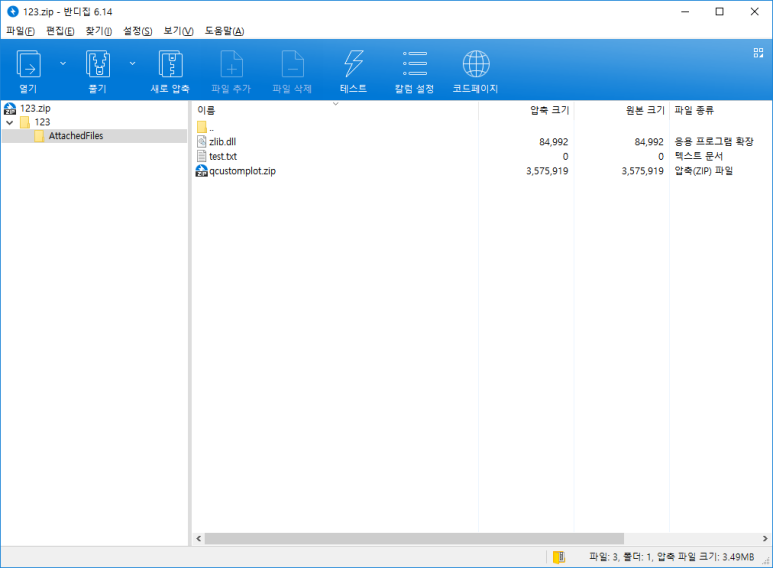
1) tar.exe -cvf 123.zip 123/AttachedFiles

폴더도 같이 압축이 된것을 볼 수 있다.

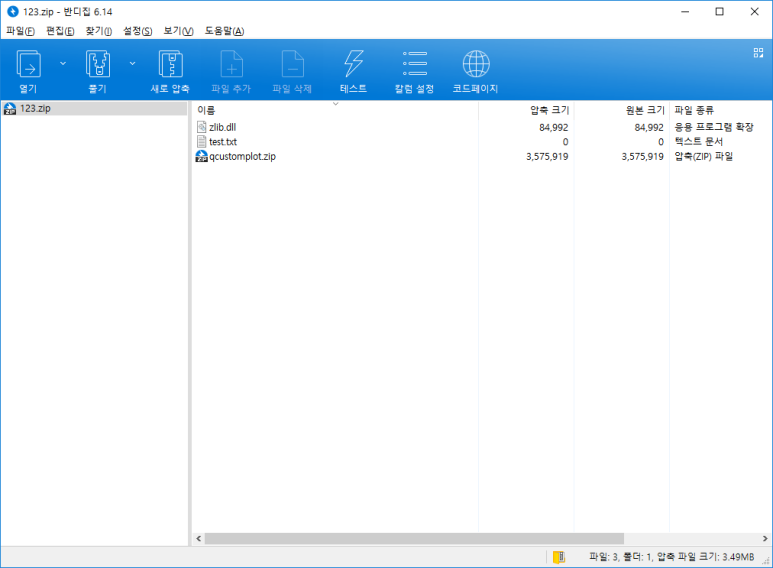
2)tar.exe -cvf 123.zip -C 123/AttachedFiles .

폴더 없이 압축된것을 볼 수 있다.


QProcess::execute(QString("tar.exe -cvf 파일이름.zip -C 압축할폴더 .));

설명
1) tar.exe의 경로가 다르다면 tar.exe 앞에 경로를 붙여준다.
2) -cvf는 명령어 이다. 기본적으로 압축시에 거의 이 형식으로 쓴다.
3) 파일이름.zip를 다른경로에 저장시키려면 파일이름.zip앞에 경로를 붙인다.
4) -C 와 . 의 경우 위의 두그림과 같이 폴더를 같이 압축할건지, 폴더 없어 파일만 압축할 건지를
정하는 명령어이다.

tar압축 시 절대 경로 관련 참조 
https://kldp.org/node/140877


Posted by 이건칠
,